1.
DMA 서비스를 제공하는 회사들중 ptp가 아닌 ntp를 시간프로토콜로 제공하는 회사들이 있습니다. 사실 DMA매매를 위해 한대서버만을 운용하는 경우 시간프로토콜이 특별히 중요하지 않을 수 있습니다. 서버가 여러대이고 서버간의 레이턴시를 측정하지만 NTP일 때 비교에 애를 먹습니다. 이번 경우도 그렇습니다.
처음 예상은 B라는 서버가 빠를 것으로 예상했습니다. 결과가 의외였습니다. A가 빠릅니다. 그런데 A의 시간이 표준시간보다 빠릅니다. 무언가 이상합니다.
이렇게 시작하였습니다.
NTP를 이용할 경우 NTP 현황을 모니터링할 수 있는 도구가 여럿있습닏. 그중 chronyc tracking을 이용하였습니다.
[ium@localhost ~]$ chronyc tracking
Reference ID : C0B2E082
Stratum : 3
Ref time (UTC) : Thu Jul 30 07:33:04 2026
System time : 0.000000035 seconds fast of NTP time
Last offset : -0.000035380 seconds
RMS offset : 0.000023070 seconds
Frequency : 19.078 ppm slow
Residual freq : -0.032 ppm
Skew : 0.269 ppm
Root delay : 0.001246362 seconds
Root dispersion : 0.022376411 seconds
Update interval : 130.0 seconds
Leap status : Normal
[ium@localhost ~]$ chronyc tracking
Reference ID : C0B2E082
Ref time (UTC) : Thu Jul 30 07:33:00 2026
System time : 0.000001135 seconds slow of NTP time
Last offset : -0.000001552 seconds
RMS offset : 0.000009774 seconds
Frequency : 11.599 ppm slow
Residual freq : -0.000 ppm
Skew : 0.037 ppm
Root delay : 0.001207937 seconds
Root dispersion : 0.018294800 seconds
Update interval : 130.2 seconds
Leap status : Normal
위 결과에 나오는 필드에 대한 설명은 18.3.5.1. chrony 추적 확인을 참조하세요.
두 서버 System Time의 비교입니다.
System time : 0.000000035 seconds fast of NTP time
System time : 0.000001135 seconds slow of NTP time
Last Offset값을 비교하면 큰 차이가 있습니다.
Last offset : -0.000035380 seconds
Last offset : -0.000001552 seconds
RMS Offset(평균 제곱근 오차)와 Skew(클락 오차 예상치)도 차이가 있습니다.
마이크로초 수준에서 두 서버를 비교하기 어렵습니다. 원거래서버라고 하면 포기를 하겠지만 같은 스위치의 같은 Vlan으로 물린 서버이기때문에 오차를 줄여보려고 시도했습니다.
2.
구글링을 해보니까 chrnoyd.conf에 다음과 같은 변수에 설정하라고 합니다.
maxslewrate rate-in-ppm
The maxslewrate directive sets the maximum rate at which chronyd is allowed to slew the time. It limits the slew rate controlled by the correction time ratio (which can be set by the corrtimeratio directive) and is effective only on systems where chronyd is able to control the rate (i.e. all supported systems with the exception of macOS 12 or earlier).For each system there is a maximum frequency offset of the clock that can be set by the driver. On Linux it is 100000 ppm, on FreeBSD, NetBSD and macOS 10.13+ it is 5000 ppm, and on Solaris it is 32500 ppm. Also, due to a kernel limitation, setting maxslewrate on FreeBSD, NetBSD, macOS 10.13+ to a value between 500 ppm and 5000 ppm will effectively set it to 500 ppm.
In early beta releases of macOS 13 this capability is disabled because of a system kernel bug. When the kernel bug is fixed, chronyd will detect this and re-enable the capability (see above limitations) with no recompilation required.
corrtimeratio ratio
When chronyd is slewing the system clock to correct an offset, the rate at which it is slewing adds to the frequency error of the clock. On all supported systems, with the exception of macOS 12 and earlier, this rate can be controlled.The corrtimeratio directive sets the ratio between the duration in which the clock is slewed for an average correction according to the source history and the interval in which the corrections are done (usually the NTP polling interval). Corrections larger than the average take less time and smaller corrections take more time, the amount of the correction and the correction time are inversely proportional.
Increasing corrtimeratio improves the overall frequency error of the system clock, but increases the overall time error as the corrections take longer.
By default, the ratio is set to 3, the time accuracy of the clock is preferred over its frequency accuracy.
The maximum allowed slew rate can be set by the maxslewrate directive. The current remaining correction is shown in the tracking report as the System time value.
위 패러미터의 값을 아래와 같이 수정하였습니다.
maxslewrate 1000
corrtimeratio 2
그리고 NTP동기화를 위해 사용하는 네트워크 인터페이스의 Jitter를 줄이기 위한 작업을 하였습니다. 이와 관련이 있는 부분이 Interrupt Coalescing입니다.
31.12. 인터럽트 병합 설정 튜닝을 보면 usecs를 설명합니다.
usecs 값은 인터럽트를 생성하기 전에 수신자 또는 송신기가 대기하는 마이크로초 수를 나타냅니다.
현재 값 설정이 어떻게 되어 있는지 확인하는 방법이비다.
ethtool -c eth0
Coalesce parameters for eth0:
Adaptive RX: off TX: off
stats-block-usecs: 999936
sample-interval: 0
pkt-rate-low: 0
pkt-rate-high: 0rx-usecs: 18
rx-frames: 12
rx-usecs-irq: 18
rx-frames-irq: 2tx-usecs: 80
tx-frames: 20
tx-usecs-irq: 18
tx-frames-irq: 2rx-usecs-low: 0
rx-frame-low: 0
tx-usecs-low: 0
tx-frame-low: 0rx-usecs-high: 0
rx-frame-high: 0
tx-usecs-high: 0
tx-frame-high: 0
위에서 굵은 글씨로 한 값을 모두 0으로 설정합니다. 대기시간을 없앱니다.
sudo ethtool -C eth0 rx-usecs 0 tx-usecs 0
3.
이상으로 하면 NTP의 오차를 줄일 수 있습니다. 그런데 당장 동기화를 해서 시험해야 하는 상황이면 오차를 빨리 줄여야 합니다. 특히 느린 서버가 빨리 동기화하도록 명령어를 추가합니다.
sudo chronyc burst 4/4
sudo chronyc -a ‘burst 4/4’
이를 실행하면 Chrnoyc가 NTP 서버에게 4개의 응답요청을 보내고 4개의 유효한 응답을 받아라는 명령을 실행합니다.이처럼 하는 이유는 Chrony는 몇 분 간격(정기 폴링)으로 서버에 요청을 하고 응답을 기다립니다. 하지만 burst 명령을 내리면 이 대기 시간을 무시하고, 몇 초 간격으로 패킷을 연속으로 보내서 동기화를 즉시 완료합니다.
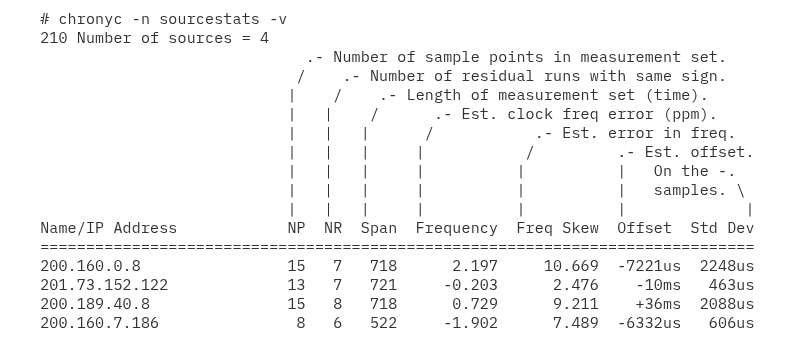
자! 이제 결과를 확인할 시간입니다. 명령어는 chronyc sources입니다. 아래는 생플입니다.