1.
오버클락서버를 오래 사용하면 이런저런 장애가 발생합니다. 보통 3년 워런티를 보장하므로 교체도 가능하지만 원인을 파악하는 것이 중요합니다. 얼마전 syslog입니다.
claude를 사용하지 않지만 gemini외 다양한 AI의 도움을 받으면 로그를 분석해줍니다.
[44159.677576] invalid opcode: 0000 [#1] SMP NOPTI
[44159.677586] CPU: 2 PID: 88784 Comm: cpuverify Kdump: loaded Not tainted 4.18.0-553.89.1.el8_10.x86_64 #1
[44159.677598] Hardware name: ASUS System Product Name/ProArt Z790-CREATOR WIFI, BIOS 2703 10/23/2024
[44159.677609] RIP: 0010:page_add_new_anon_rmap+0x4d/0xe0
Gemini가 해석할 결론중 하나는 이렇습니다.
The Significance: An invalid opcode in a core kernel function like page_add_new_anon_rmap on a stock RHEL 8 kernel (4.18.0-553) strongly points to underlying hardware instability, memory corruption, or CPU execution faults, rather than a normal software bug.
해결책으로 제시하는 것으로 다음과 같습니다.
1.Update BIOS(Intel Microcode)
2.Overclock Setting
3.Kernel CMDLINE
첫째 Microcode입니다. 하드웨어를 살피면서 배오는 개념들이 많습니다. Microcode도 동일합니다. 이런 역할을 한다고 합니다.
인텔 마이크로코드(Intel Microcode)는 x86 명령어 세트를 하드웨어 수준에서 실행하고, 프로세서의 동작을 제어하며, 보안 취약점(Spectre 등)과 기능적 오류(Errata)를 수정하기 위해 하드웨어에 적용하는 하위 수준의 펌웨어 패치입니다
Demystifying Microcode: How Firmware Powers the Modern Computer Revolution을 보면 컴퓨터가 발전하면서 매우 중요한 역할을 한 개념인 듯 합니다. 마이크로코드중 오버클락과 관련하여 이런 설명을 합니다.
Prevents Further Damage: Microcode 0x12F (building on earlier 0x129 and 0x12B patches) modifies the CPU’s internal voltage-request algorithms. It enforces strict voltage caps—especially when the system is sitting idle or transitioning between low and high power states for extended periods—so the silicon stops degrading.
13세대 혹은 14세대 CPU가 나오면서 전압관리와 관련한 버그가 있었나 봅니다. 그래서 과전압이 되도록 하여 CPU불안정성이 높아지는 보고가 있었습니다. 이를 해결하기 위해 패치를 하라는 뜻입니다. 현재 운영중인 서버중 한대에서 버전을 확인해보았습니다.
[ium~]$ grep microcode /proc/cpuinfo | sort | uniq
microcode : 0x12f
위에서 언급한 0x12f입니다. 전원과 관련한 버그는 아닌 듯 합니다. 혹 microcode와 관련한 자세한 정보는 How to Update Intel CPU Microcode on Linux (2026 Guide)에서 보시면.
2.
다음은 오버클락입니다. Gemini의 설명중 일부분입니다.
The Overclock Exceeds Silicon Limits: Even with microcode 0x12F installed, an aggressive overclock like this completely overrides Intel’s safety guardrails, pumping massive voltage into the CPU cores.
설명중 Safety Guardrail을 다룬 부분입니다.Do modern GPU/CPU’s contain a fail-safe for overheating or is it in the BIOS?라는 질문에 대한 답변입니다.
All CPU’s produced this side of the millennium have heat sensors. They are standardized and tend to work well enough that no one really thinks about how they get their information across except hardware manufacturers.
The temperature is monitored in the BIOS, which usually has a setting to control the warning temperature and the shutdown temperature. In the event that this fails and the temperature gets too high, most newer CPU’s also have a hardware failsafe called #THERMTRIP, which will initiate an emergency shutdown.
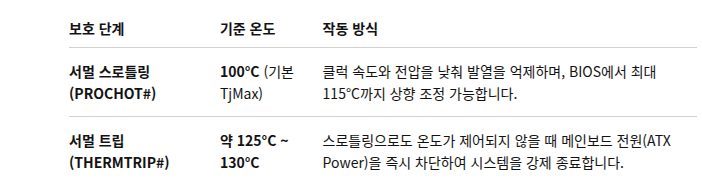
오버클락용으로 많이 사용하는 i9-14900KS의 경우 임계치 온도가 100도입니다.
The Intel Core i9-14900KS has a default thermal throttling threshold (TJMax) of 100°C
이를 넘은 경우 CPU냉각을 위해 클락속도를 줄이거나 전압을 낮춥니다. TJmax와 다른 개념의 수치가 있습니다. THERMTRIP(Thermal Trip)입니다. 실리콘의 영구적인 손상을 막고 하드웨어 안전차원에서 시스템 전원을 강제로 차단하는 최우의 방어선같은 개념입니다. CPU THERMTRIP을 감지하면 CPU가 THERMTRIP# 핀을 통해 메인보드에 이상을 신호하고, 메인보드 회로가 즉시 전원을 끊어 시스템이 꺼지게 합니다.
The CPU has one or more temperature sensors, as well as some temperature collection control circuits. When the CPU temperature is too high, it will trigger overheating protection through some pins. At a lower temperature, it will generate an interrupt or exception, notifying the BIOS or OS to increase the fan speed. It will also reduce its own heat generation according to the configured power management strategy by lowering the frequency. If the temperature is too high, it will trigger a power-off through the motherboard’s circuit.
Do the #prochot and #thermtrip instructions have thermal protection for the CPU?중에서
i9-14900KS의 설정입니다.
3.
coredump가 발생하면 coredumpctl 명령어를 이용하여 여러가지를 할 수 있습니다.
